Categories and private notes
Categories
Open Library → Category on desktop, or Category at the top of Photos on a phone. The six categories are Videos, Panoramas, Live Photos, Animated Images, Screenshots and Portrait Mode. Opening one shows matching media from the whole account, with 100-item pages and the usual viewer. Categories can overlap. RAW categorization and RAW decoding are outside this release.
Video, Live Photo and animation membership comes from the actual media type, paired Live Photo assets and frame information. A Live Photo's attached motion clip is not a second library item. Animated GIF, APNG and WebP files are separate from Live Photos.
Semantic classification rules are versioned (currently version 2):
- Panoramas use explicit Google panorama XMP, or a long-to-short dimension ratio of at least 2.5:1. Recognized screenshots are excluded from this heuristic.
- Screenshots use explicit metadata or a filename starting with Screenshot, Screen Shot, Screen Capture, 截屏, 屏幕截图 or 螢幕截圖. Resolution alone does not identify a screenshot.
- Portrait Mode uses explicit capture metadata. Apple's MakerNote
ImageCaptureType = 2is supported. Faces in an ordinary photo do not make it a Portrait Mode photo.
The built-in reader supports classification XMP in JPEG, uncompressed PNG iTXt and WebP. Apple capture metadata is read from the existing EXIF parser, including supported HEIC containers. Exported or edited photos may lose metadata; other cameras may use unsupported proprietary tags. These cases are not inferred with AI.
In the viewer's Category section, set Panorama, Screenshot or Portrait Mode to Include, Exclude, or Auto. Manual choices survive content replacement and automatic reprocessing. Structural categories cannot be overridden.
Existing media is classified in the background after upgrade. The category overview shows outstanding work; use Refresh to update counts. An unavailable source stays pending and retries automatically. Classification is independent of the AI feature switches.
Category cards show up to three latest media covers in a stack, with a different icon for each category. Empty categories keep a blank preview area. Preview rows are queried in one bounded database request and use the authenticated thumbnail endpoint.
Video thumbnails use a display-oriented JPEG frame at min(1 second, duration / 10), falling back to the first decodable frame. They are at most 400px on the longest edge. New and replaced videos enqueue a persistent job; migration 15 also queues existing videos. Generation is independent of AI. Missing thumbnails show a video placeholder, never the original MP4 as an image. Animated WebP first-frame decoding uses the bundled libvips when FFmpeg cannot decode it.
Notes
The viewer's Notes section supports multiple notes on a photo or video. Notes contain plain text with paragraphs and line breaks, up to 100,000 characters each. HTML and Markdown are displayed as text.
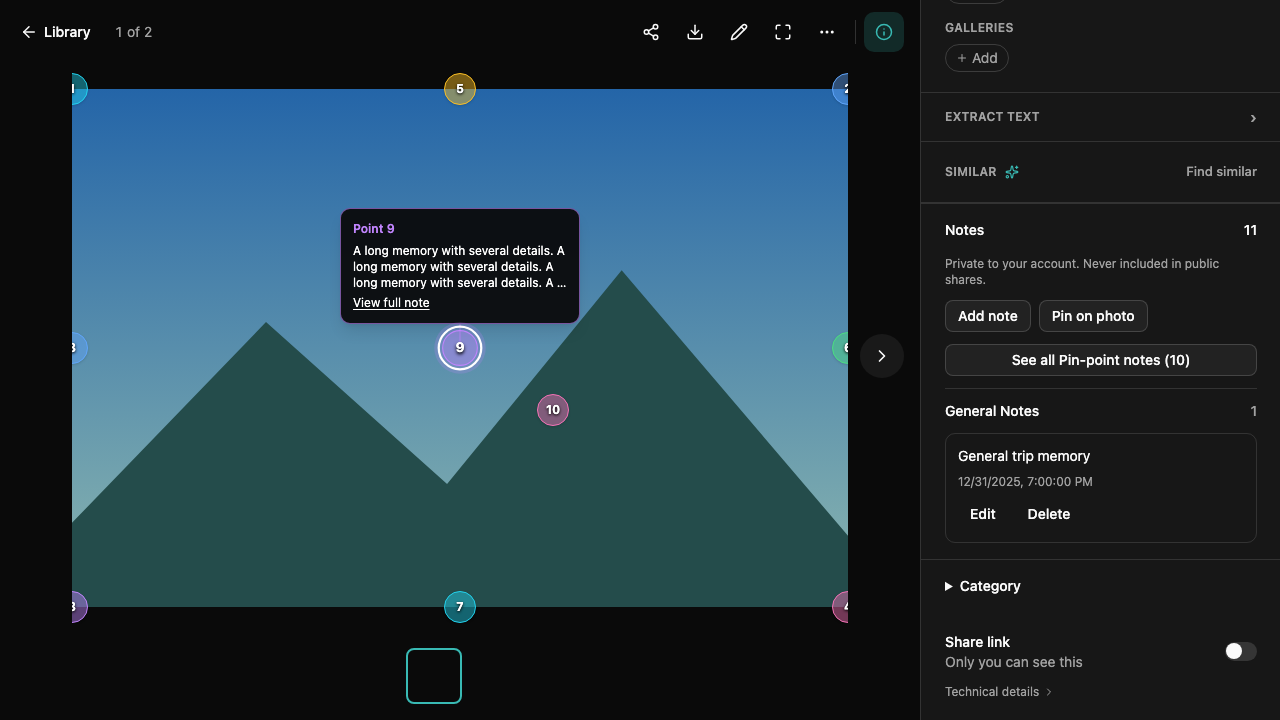
Add note creates a general note. On photos, Pin on photo lets you choose a point before saving. Hover, focus or click a numbered marker to preview its note. Click again, click an empty area of the photo, or press Escape to dismiss the preview. View full note opens the Pin-point Notes list and scrolls to the complete note; select a point note to highlight its marker. Edit a note to reposition its point or remove the point. Unsaved edits require confirmation before leaving. Deleting a note requires confirmation.
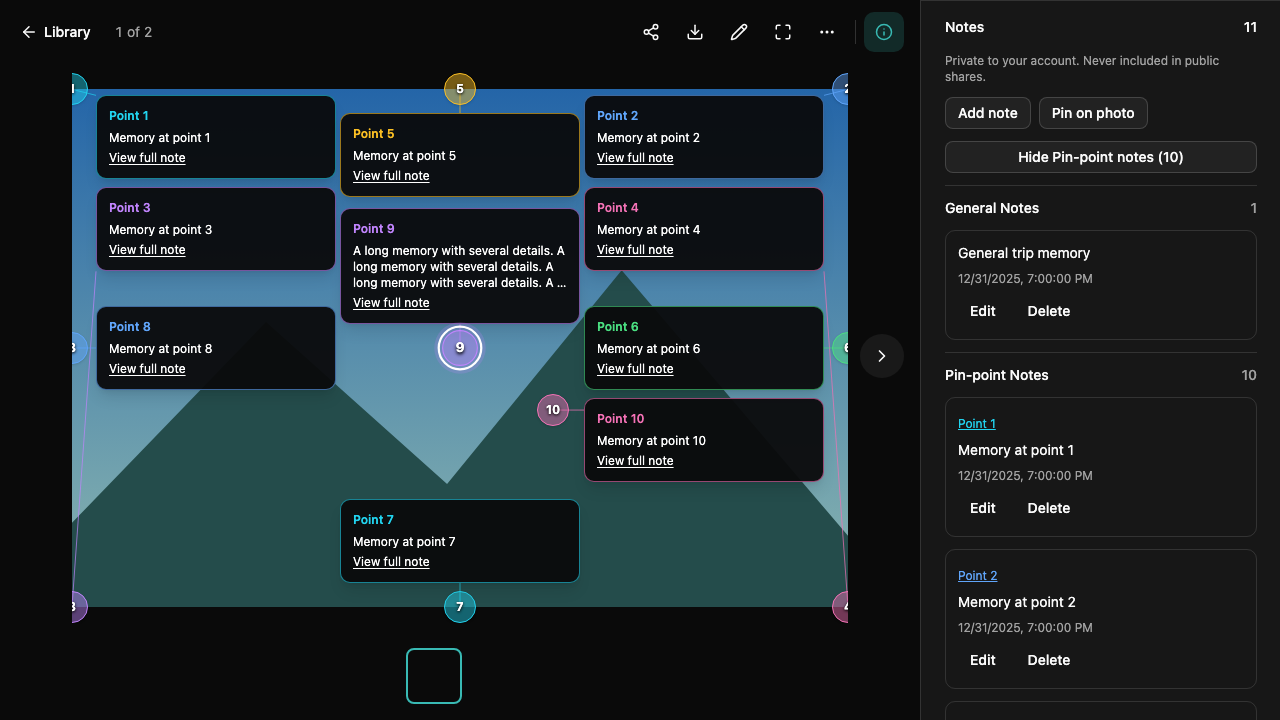
General Notes is the default list when Notes is expanded. Semi-transparent markers use six stable colors, with numbering independent of general notes. See all Pin-point notes reveals a separate Pin-point Notes section and all visible point previews. Click Hide Pin-point notes to return to general notes. Previews show up to three lines, move inward near photo edges, and spread out when possible; densely packed previews may overlap, with the active preview in front. Closing Notes or switching photos resets the preview state.
Markers are shown only while Notes is expanded. They follow the displayed photo when zooming, resizing and entering fullscreen. Animated images use their static thumbnail while Notes is open. Live Photo playback hides markers. Videos support general notes, without timestamps or point annotations.
Notes belong to the account that owns the media. Public share pages and share-token APIs expose neither note text, counts nor markers. Notes stay in Photoly's database: a disconnected NAS does not prevent reading or editing notes while the application server remains reachable.
Replacing media, cropping it or saving a rotation keeps the note text but marks old points needs repositioning. Those points disappear from the new image until repositioned. Deleting media deletes its notes. Concurrent saves use revisions; a conflict preserves the local draft and asks you to reload the saved note rather than overwrite another device's changes.
The following screenshots use a synthetic landscape and sample notes.
Deployment and background work
Migration 00014_categories_notes.sql adds notes, classifications and manual overrides, and migrates nonempty legacy photo_extra.extra_photo_note values to general notes. It queues existing media without decoding files during migration. Back up the database before normal deployment as usual; a migration rollback removes the new notes and classification tables.
The category worker uses one active media operation per server process, at most ten claims per tick, database row leases and SKIP LOCKED. A lease lasts two minutes; media work has a 60-second context deadline. Failed reads retry from 30 seconds up to one hour. A replacement resets the pending task and changes its lease token, so an old result cannot be published against new content. A restart resumes pending work or reclaims expired leases. The worker does not load an AI model.
Queue state lives in media_classification (state, attempts, next_attempt, error, content_version, rule_version). Manual choices live separately in media_category_override; reclassification must not delete them. Before introducing a new rule version, explicitly enqueue the applicable existing rows as part of that release.
The OpenAPI schema documents /photo/categories, category paging and overrides, and /photo/notes. Notes require account-header authentication and use private, no-store responses.
Validation
The release checks include a migrated PostgreSQL/pgvector database, account-isolation and note-revision integration tests, classification retries and replacements, read-only coalesced WebDAV probes with permission failure/recovery, Vue tests and browser flows on Chromium, WebKit and a mobile viewport. Optional real AI-model evaluation is separate from these changes.
A local Docker database test inserted 100,001 indexed media rows in batches, then fetched two non-overlapping 100-item category pages and category counts in about 0.50 seconds. This measures database browsing only, not file scanning, network transfer, image decoding or production throughput. Reproduce with PHOTOLY_SCALE_TEST=1 TEST_DATABASE_URL=... go test ./internal/server -run TestCategoryLargeLibraryPagination -v against an isolated migrated test database.
Preview update operations
Migration 00015_category_previews_video_thumbnails.sql requeues rule-version-1 classifications without changing manual overrides and creates video_thumbnail_job. Its worker runs one extraction at a time per process, with three-minute leases and a 90-second work deadline. Decoder failures retry up to five attempts; unavailable source reads remain pending and retry after a minute. Replacements reset the task and invalidate prior leases; deletes cascade. To retry a repaired decoder failure, an operator can reset the affected failed job to pending, clear attempts/lease/error, and set next_attempt=now() in this table. Existing valid media never needs to be re-uploaded.
The sample manifest and reproducible preparation/import tools are in scripts/category-samples/ at the repository root. Synthetic fixtures are explicitly labeled and never used as evidence of native camera metadata compatibility or face-recognition quality.